

Yes, this exists
Yes. An AI that reads your email and Slack and suggests tasks is a real category, not a hypothetical. The plain name for it is AI project management for agencies: a tool that follows the conversations where client work happens and suggests the task, owner, date or status change that conversation implies. Jensi is one example. Jen, Jensi's AI agent, reads email, Slack, Microsoft Teams and meeting notes, links each one to the project it belongs to, and suggests an update. A person approves it before anything changes.
That is a different job from an inbox assistant that drafts replies, or a meeting assistant that writes up a transcript. Those tools are useful for what they do. Neither one tells you which project a Slack message belongs to, and neither one keeps a board of tasks, owners and dates current. This page walks through what an AI that reads email and Slack and suggests tasks actually does, what it does not do, and how to tell it apart from the tools that only handle one channel.
What an AI that reads email and Slack and suggests tasks actually does
Strip away the marketing and the job is narrow and specific. This is also what people usually mean by an AI task management assistant, something that watches where work gets agreed and turns it into tracked items, rather than a generic to-do app with a chatbot bolted on:
- Reads the conversation. Email, Slack, Teams messages, meeting notes from a notetaker. Not one channel in isolation.
- Links it to the project it belongs to. A client asks for a change in a Slack thread. The AI connects that thread to the project and task the ask is actually about, not a flat, context-free to-do.
- Suggests a task, or a change to one. A new task, or an update to owner, date, status or description on an existing one.
- Keeps the source attached. The suggestion carries a link back to the message or meeting it came from, so whoever approves it can check the original context in one click.
That is the whole loop: read, connect, suggest, keep the receipt. The work of turning a conversation into a tracked task still happens, it just does not fall entirely on a person retyping it from memory an hour later. Some tools market this as email to task automation, but the label only earns its keep if the task lands on the right project with an owner and a date, not just a line item in an inbox folder.
What it does not do
A few honest limits matter here, because the category gets oversold elsewhere.
- It does not silently change your board. A person approves each suggestion by default. Nothing moves until someone says yes.
- Auto-accept exists, but it is opt-in and off. An admin can turn on two narrow settings: letting high-confidence subtasks get added automatically (with one-click undo), and turning high-confidence Slack asks into tasks without a manual approval step. Neither setting applies to projects linked to Jira, and changes to an existing task's owner, date, status or title always wait for a person.
- It is not a transcript generator. The output is a task with an owner and a date, not a meeting summary or an inbox digest. If what you need is a readable recap of a call, that is a different tool.
How this differs from an inbox or meeting assistant
It helps to name the three categories buyers tend to confuse.
Inbox assistants draft replies and summarize threads. Microsoft Copilot in Outlook and similar tools fall here: they help you move through your own inbox faster, but they do not know which project or task a given email is about, and they do not update anything outside the inbox.
Meeting assistants capture notes and action items, but only from the call itself. If a client changes a deadline over email an hour after the meeting ends, a meeting-only tool has no way to catch it.
Slack assistants that prepare drafts for review are a step closer, and worth naming directly. If you have searched for an AI that turns Slack messages into tasks, Geniusly is one answer worth knowing about: an AI assistant that lives in Slack and reads authorized context from connected apps, Gmail, Drive, Sheets, Slack itself, GitHub, Linear and Google Ads, then prepares reply text, reports and project briefs for a person to review. By its own FAQ, those other connected apps are read-only: Geniusly does not send email or save Gmail drafts, and its interactive examples use sample clients rather than measured results. That makes it useful for drafting a reply or pulling together a report inside Slack. It is not built to keep a project board of tasks, owners, dates and status current, and it does not sync changes back to a tool like Jira.
The gap all three leave is the same: someone still has to look at the draft, the summary or the brief and manually turn it into a tracked task with an owner and a due date on the board the team actually works from.
Where Jensi fits
Jensi is AI project management for agencies. Jen, Jensi's AI agent, reads email, Slack, Teams and meeting notes, links each conversation to the right project, and suggests the task, owner, date or status change that conversation calls for. Every suggestion keeps a link to its source message or meeting, so the person approving it can check the context before it lands. As an AI task manager app, Jensi is built around that approval step, not around replacing it.
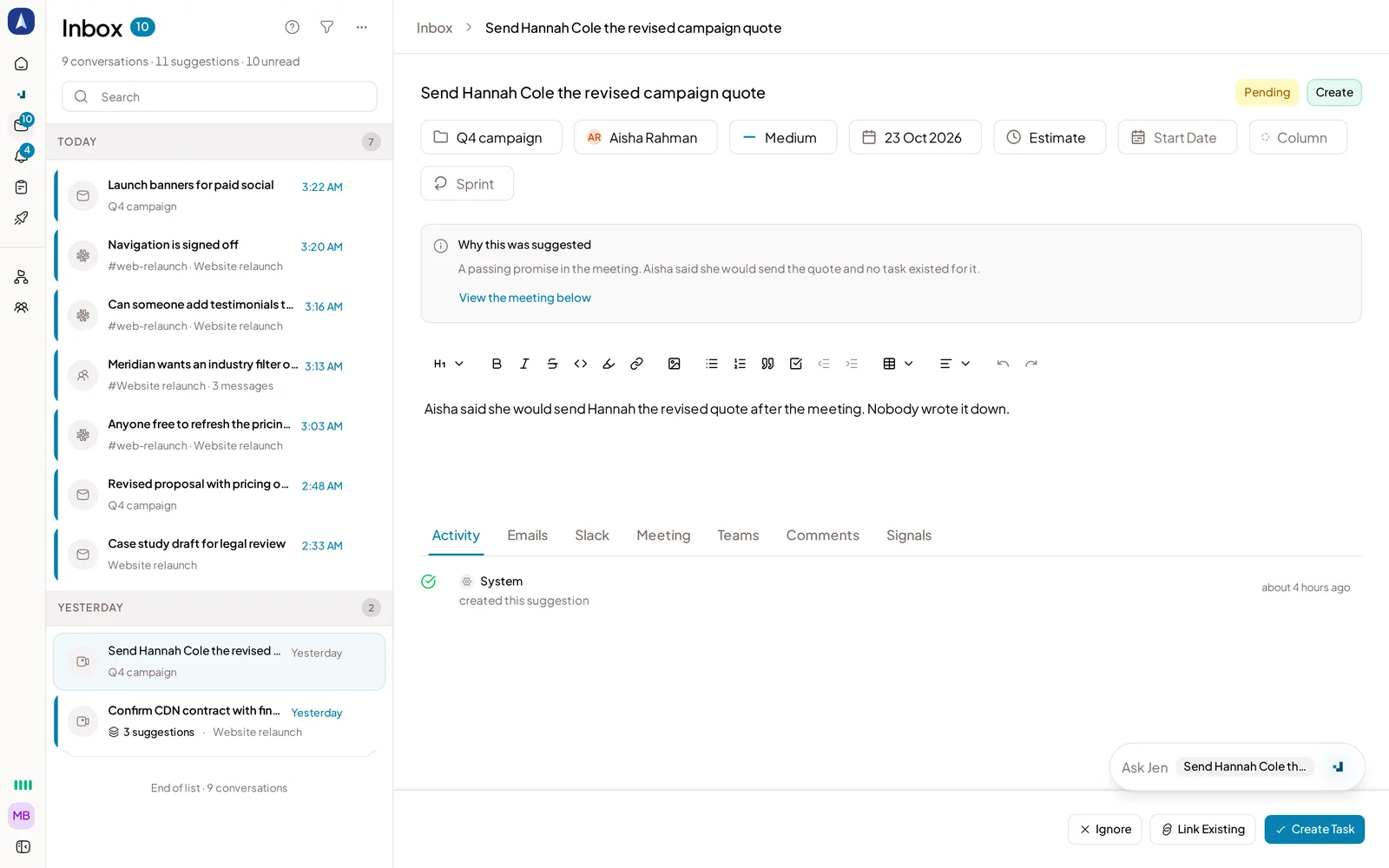
A pending suggestion waiting for approval
Approved changes land on a real project board, either in Jensi itself or in Jira Cloud, with two-way sync: changes made in Jira flow back into Jensi too. The Teams and Outlook integration is Microsoft-approved, and Google verification for the Gmail and Slack connections is complete, so the read access runs through the standard app review process rather than a workaround. Mir Tech, an agency, runs its own client work through Jensi day to day. Behind the suggestions themselves, the team has run more than 100 prompt evals specifically to cut down noisy or low-value suggestions, since a suggestion nobody trusts is worse than no suggestion at all.
If you want to see the loop end to end, from a Slack request to a task waiting for approval, you can connect a workspace and try Jensi on your own conversations.
Questions to ask before you pick one
A short checklist, since "does it use AI" is not a useful filter anymore:
- Does it connect the message to the specific project and task it is about, or does it just drop a flat item into a generic list?
- Does a person approve the change before it lands, or can it move without anyone checking it?
- Does the suggestion keep a link back to the original email, Slack message or meeting?
- Can it update an existing task's owner, date or status, or does it only create new ones?
- Does it sync to a tool your team already uses, like Jira Cloud, or does the work only live inside the new tool?
Run any tool you are evaluating through those five questions with a real example from your own inbox or Slack workspace. The answers tell you more than a features page will.
What still needs a person
Nothing here runs unattended by default. A person reviews and approves task suggestions, decides whether auto-accept settings are worth turning on for narrow, high-confidence cases, and still owns judgment calls that depend on context the AI cannot see, like whether a client's offhand comment in a meeting was actually a scope change or just thinking out loud. Treat the suggestion as a draft someone wrote for you to check, not a decision already made.